
Changing one detail in a picture used to require layers, masks, brushes, and hours of careful retouching. Even a simple request—such as replacing a background while keeping a product untouched—could become difficult without professional editing experience.
Generative AI has made that workflow far more accessible. Instead of manually selecting every edge, you can upload an image, describe the result you want, and ask the model to create a revised version. The challenge is no longer learning dozens of controls. It is learning how to communicate the edit clearly.
A browser-based chatgpt image editor provides a focused workflow for editing photos, products, posters, portraits, and other visual assets with GPT Image 2. You can combine a base image with purposeful visual references, describe changes in natural language, and choose practical output settings for different projects.
What Is a ChatGPT Image Editor?
A ChatGPT Image Editor is a prompt-based tool that uses an existing image and written instructions to generate an edited version. It differs from a traditional pixel editor because you do not paint directly onto the original file. The AI interprets your image, your prompt, and any references before creating a new result.
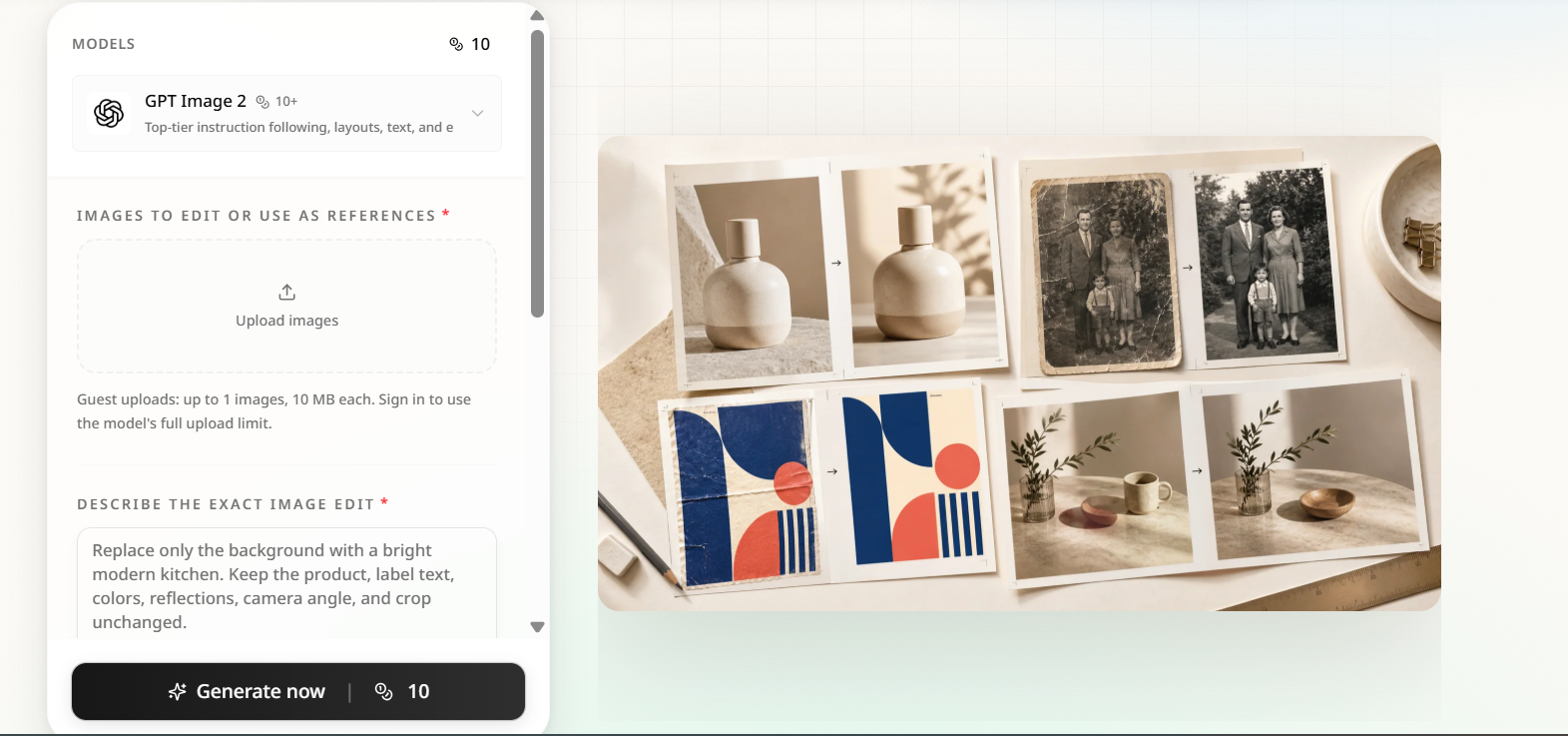
This approach is useful when the requested change is easier to explain than to perform manually. You might ask the editor to place a bottle in a modern kitchen, remove a distracting object from a portrait, update a poster headline, change the material of a chair, or repair visible damage in an old photograph.
The process remains generative. The model creates new pixels rather than locking every unedited area. For that reason, a successful workflow includes both a precise prompt and a careful review of the output.
Why Use GPT Image 2 for Image Editing?
GPT Image 2 is selected by default on the tool page, giving users a direct starting point for prompt-based editing. The interface also keeps the model selector visible, allowing the available fields and limits to adjust when another supported model is chosen.
One of its most practical strengths is support for multiple visual inputs. The workflow can accept a base image plus references for a person, product, garment, logo, style, scene, or composition. GPT Image 2 currently supports up to 16 image inputs in this editor, although most projects benefit from using only the references that are genuinely necessary.
The available controls include automatic sizing and common square, portrait, and landscape aspect ratios. When GPT Image 2 remains selected, you can also choose 1K, 2K, or 4K output. These options help you prepare images for product pages, social posts, posters, presentations, or larger creative layouts.
How to Edit an Image Step by Step
The editing process is simple, but the quality of your instructions matters. A vague request gives the model room to reinterpret the whole scene. A focused request defines the target, location, replacement, and details that must remain recognizable.
Step 1: Choose a Strong Base Image
Upload the image you want to edit first. This tells the editor which composition should serve as the foundation of the result.
Use the clearest source file available. A sharp, well-lit photograph gives the model better visual evidence for faces, textures, packaging, text, and object boundaries. Heavy compression, extreme blur, or missing details can make precise preservation more difficult.
The editor accepts common formats including PNG, JPG, JPEG, and WebP when GPT Image 2 is selected.
Step 2: Add Only Useful References
Reference images can show the editor what a replacement product, outfit, environment, logo, or visual style should look like. They are especially helpful when words alone cannot describe an important detail.
Label the purpose of every reference in your prompt. For example, explain that the first image is the base photo, the second shows the correct package design, and the third provides the desired kitchen environment.
More references do not automatically produce a better result. Conflicting images can introduce uncertainty, so include only material that contributes necessary visual information.
Step 3: Describe One Clear Change
A reliable prompt starts with the desired result and then identifies the precise target. It also explains where the target appears and lists the elements that should remain unchanged.
Instead of writing:
Make this product photo look better.
Try:
Replace only the gray background with a bright modern kitchen using soft morning light. Keep the bottle shape, label text, cap, brand colors, reflections, camera angle, shadows, and crop unchanged.
The second prompt defines both the creative change and the preservation boundaries. Although those boundaries are not absolute locks, they give the model a much clearer editing objective.
For complex projects, complete one major change at a time. Change the background first, inspect it, and then request a smaller lighting or color adjustment. Combining a new background, different clothing, revised text, and a new camera angle in one prompt creates more opportunities for unwanted drift.
Step 4: Select the Output Format
Choose an aspect ratio that matches the final destination. A square format can suit catalog images and profile content, while portrait layouts work well for mobile-first posts. Landscape formats are often more practical for banners, presentations, and website headers.
Select the resolution according to the project’s needs. A quick concept may not require the same output size as a campaign visual or print-oriented design. Higher resolution can reveal small problems more clearly, so inspect text, edges, faces, hands, and product details at full size.
Step 5: Generate, Inspect, and Refine
After generating the result, compare it with the original rather than judging it in isolation. Look beyond the requested editing area.
Check faces, body proportions, logos, packaging geometry, visible words, reflections, shadows, and background edges. If one detail changed unexpectedly, address that specific problem in the next prompt.
A useful refinement instruction might say:
Keep the new kitchen background, but restore the original bottle label exactly as shown in the base image. Preserve all other elements from the latest result.
Focused corrections are usually easier for the model to interpret than a completely rewritten prompt.
Practical Ways to Use a ChatGPT Image Editor
Product and E-Commerce Images
Online sellers can explore studio backgrounds, seasonal environments, and lifestyle compositions without organizing a new photo shoot for every idea. A single packshot can become the starting point for several campaign directions.
Product accuracy still requires human review. Compare labels, colors, logos, proportions, and packaging details with approved source material before publishing the result.
Posters and Marketing Graphics
Marketing teams can replace headlines, test new color treatments, adapt campaign copy, and explore localized poster layouts. When changing text, quote the exact replacement wording and describe its position, alignment, type character, color, and line breaks.
Generated lettering can appear convincing while containing subtle mistakes. Proofread every visible word at full resolution.
Portrait and Social Content
Creators can change backgrounds, adjust clothing, remove distractions, or reframe a portrait for a different platform. Reference images may help communicate a desired garment, location, or visual mood.
Identity should never be assumed to remain perfectly fixed. Review facial features, hair, accessories, hands, skin texture, and body proportions before using the output publicly.
Old Photo Restoration
A ChatGPT Image Editor can create a plausible repaired version of a faded or damaged photograph. Prompts can request reduced scratches, dust, discoloration, blur, or weak contrast while preserving faces and period details.
Restoration cannot recover information that no longer exists in the source. Treat reconstructed details as an interpretation rather than verified historical evidence.
Tips for More Consistent Results
- Name the target precisely: Use position, color, shape, or surrounding objects to identify what should change.
- Write a preservation list: Mention faces, products, logos, text, lighting, perspective, shadows, and crop when they matter.
- Assign reference roles: Tell the editor what each uploaded image contributes instead of expecting it to infer the relationship.
- Make one major edit per prompt: A sequence of controlled changes is easier to inspect than one large transformation.
- Review the entire composition: Generative editing may affect areas outside the intended target.
- Save successful prompt structures: Reusable prompt patterns can make recurring product, poster, or social-media work more consistent.
Common Mistakes to Avoid
The most common mistake is using a broad instruction such as “improve this image.” Improvement is subjective, and the model may alter composition, color, lighting, or identity in ways you did not expect.
Another mistake is requesting several unrelated changes at once. If the result drifts, you may not know which instruction caused the problem. Separate large edits into a short sequence.
Do not treat the output as automatically publication-ready. Text may need proofreading, products may require geometry checks, and portraits may require an identity review. Commercial use also depends on your rights to the source images, trademarks, product designs, and people’s likenesses.
Final Thoughts
The most effective ChatGPT Image Editor workflow is built around clarity. Start with a strong base image, add only meaningful references, request one focused change, and state exactly what should remain recognizable.
GPT Image 2 makes sophisticated visual experimentation accessible through natural-language instructions, multiple image references, and flexible output controls. It does not remove the need for judgment. Your prompt guides the edit, but your final inspection determines whether the result is ready to use.
